Welcome. If you are reading this, you are likely a CTO, VP of Engineering, or a Marketing Director tasked with scaling your organization’s digital footprint. You understand that great content and an aggressive backlink strategy are practically useless if the underlying infrastructure of your website is flawed. As a Lead Technical SEO at seougynokseg.net, I spend my days deep in the server logs, analyzing how search engines interact with complex enterprise architectures.
When an SEO company initiates a technical audit, our primary objective is not merely to check boxes; it is to uncover the invisible friction points that prevent a website from achieving peak organic visibility. We look for hidden bottlenecks that stop Googlebot dead in its tracks. We assess the danger of technical debt accumulated over years of patched code, and we evaluate the catastrophic migration risk that looms whenever you change a CMS, restructure a database, or migrate domains.
According to the Google Search Central SEO Starter Guide, the fundamental prerequisite for search visibility is simple: a search engine must be able to find, understand, and categorize your pages. To achieve this, your website must be fundamentally secure, fast, and structurally sound.
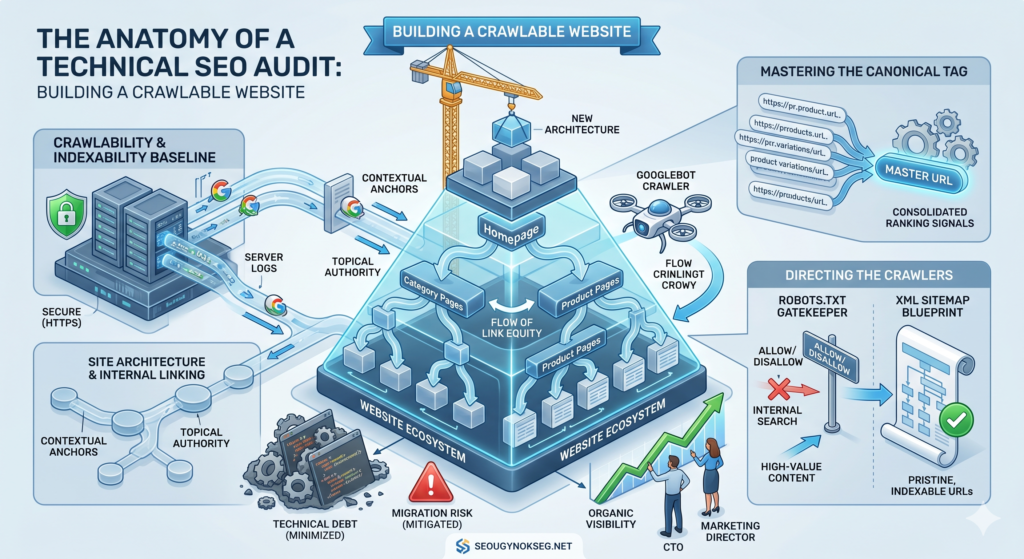
In this comprehensive, 1800-word guide, we are going to dissect the anatomy of an seo audit. We will break down exactly how we build a crawlable and indexable website, piece by piece, from the perspective of an engineer.
1. The Absolute Baseline: Crawlability and Indexability
Before discussing keywords or user intent, we must address the absolute baseline of technical performance: crawlability and indexability. These two concepts are frequently conflated, but technically, they represent entirely different phases of the search engine pipeline.
The Discovery and Crawl Phase
To crawl a website means that a search engine bot (like Googlebot) successfully requests a URL, accesses the server, and downloads the HTML response without encountering a blockade. If a page is not crawlable, the pipeline ends immediately. Googlebot operates on a strictly limited “crawl budget”—a metric determined by the server’s health and the site’s overall authority. If your server is slow to respond, throws continuous 5xx errors, or locks crawlers out via misconfigured directives, Googlebot will abandon the crawl to save resources.
A page is considered crawlable if:
- It responds with a
200 OKstatus code. - It is not blocked by a robots.txt disallow directive.
- The server response time is fast enough to prevent timeout errors.
The Rendering and Index Phase
Once a page is crawled, it moves to the indexation queue. To index a page means that Google has parsed the HTML, executed the JavaScript (if necessary and possible), extracted the meaning, and stored the document in its massive database to serve in search queries.
However, just because a page can be crawled does not mean it will be indexed. A page is considered indexable only if:
- It does not contain a
noindexmeta robots tag. - It is the canonical version of a URL (not a duplicate).
- The content is of high enough quality and uniqueness to warrant inclusion in Google’s index.
During a technical audit, our first mandate is to secure this baseline. We crawl your entire domain mimicking Googlebot’s exact user-agent to ensure that every page you want users to find is both crawlable and indexable, and that the server environment is strictly secure (enforcing HTTPS across all assets).
2. Breaking Down the Technical Audit
A true technical seo evaluation goes far beyond running an automated crawler and exporting a PDF of broken links. At seougynokseg.net, we treat a technical audit as a forensic investigation into the relationship between your server and the search engine.
Here is how we break down the core components of the audit:
Server Logs Analysis
We don’t just rely on third-party crawling software; we look at the raw server log files. By parsing the logs, we can see exactly how often Googlebot visits, which directories it gets trapped in, and where it wastes precious crawl budget on infinite loops, parameterized URLs, or low-value legacy pages.
Rendering and JavaScript SEO
Modern web frameworks (React, Angular, Vue) build pages dynamically in the browser. Search engines traditionally struggle with client-side rendering. We audit the rendering pipeline to ensure that critical content, navigation links, and meta tags are present in the initial DOM. If Googlebot has to wait 10 seconds to execute your JavaScript to see your content, that content is practically invisible. We often recommend server-side rendering (SSR) or dynamic rendering to guarantee indexability.
Core Web Vitals and Performance
Speed is a confirmed ranking factor. We audit the trifecta of Core Web Vitals:
- Largest Contentful Paint (LCP): Measuring loading performance.
- Interaction to Next Paint (INP): Measuring responsiveness to user inputs.
- Cumulative Layout Shift (CLS): Measuring visual stability.If your pages are bogged down by unoptimized images, heavy third-party tracking scripts, or render-blocking CSS, we provide a strict, developer-ready remediation plan.
3. Site Architecture and Internal Linking
Once we ensure crawlers can access the site, we evaluate how they navigate it. This brings us to site architecture and the strategic distribution of link equity through internal linking.
The Hierarchy of Information
A well-engineered site architecture should resemble a flat, logical pyramid. The homepage sits at the top, linking down to primary category pages, which in turn link to sub-categories or individual product/article pages.
The golden rule of architecture in a technical audit is click depth: No critical page should be more than three or four clicks away from the homepage.
When a website grows organically over a decade without a technical roadmap, it inevitably devolves into a tangled mess of orphaned pages (pages with no incoming links) and deep, inaccessible directories. This structural chaos is a massive form of technical debt. Search engines rely on your architecture to understand topical relevance. If a page is buried seven levels deep, Google assumes it is unimportant and will crawl it infrequently, if at all.
Distributing Link Equity
Internal linking is the circulatory system of your website. Every time a high-authority page (like your homepage or a heavily backlinked piece of content) links to another page on your domain, it passes “link equity” (traditionally known as PageRank).
During an audit, we map out the internal linking graph to ensure equity flows deliberately to your highest-converting, most important pages. We look for:
- Orphaned pages: Content that exists on the server but has zero internal links pointing to it. Crawlers can’t find these naturally.
- Contextual anchors: Using descriptive anchor text in the internal link rather than generic “click here” text, which gives Google context about the target page.
- Siloing: Grouping related content together via internal links to build dominant topical authority in a specific niche.
A highly structured internal linking strategy ensures that when Googlebots crawl a node, they are easily guided to all related, high-value nodes, maximizing the efficiency of the crawl.
4. Directing the Crawlers: robots.txt and XML Sitemap
You do not want search engines to crawl every single file on your server. Login pages, shopping carts, internal search result pages, and staging environments should remain hidden. To govern the crawl effectively, we manipulate two critical files: the robots.txt and the xml sitemap.
The Rulebook: robots.txt
The robots.txt file is the very first thing Googlebot requests when it arrives at your domain. It is a simple text file placed in the root directory that acts as the gatekeeper.
In a technical audit, we heavily scrutinize this file. A single errant forward slash (Disallow: /) can instantly de-index an entire enterprise website. We use robots.txt to conserve crawl budget by disallowing access to:
- Faceted navigation permutations (e.g., filtering a product list by color, size, and price simultaneously, which generates infinite URL combinations).
- Admin areas and user-specific dynamically generated pages.
- API endpoints.
By blocking low-value paths, you force the crawler to spend its time on your revenue-generating content.
The Map: XML Sitemap
While the robots.txt tells crawlers where not to go, the xml sitemap explicitly tells them exactly where they should go.
An XML sitemap is a structured file (often broken into an index of smaller sitemaps for large sites) containing a list of your most important URLs, alongside metadata like the last modification date.
A common critical error we find during an seo audit is a “dirty” sitemap. A sitemap should only contain a pristine list of URLs that respond with a 200 OK status code, are canonically sound, and are explicitly meant to be indexed. If your sitemap is filled with 404 errors, 301 redirects, or pages blocked by robots.txt, Google will eventually stop trusting it and ignore it entirely. We clean the sitemap to ensure it is a perfect reflection of your indexable architecture.
5. Mastering the Canonical Tag
Duplicate content is a silent killer of organic traffic. E-commerce platforms, CMS tagging systems, and complex parameter setups often generate multiple URLs that display the exact same content.
For example, all of these URLs might show the exact same product:
[https://example.com/shoes/running/speed-pro](https://example.com/shoes/running/speed-pro)[https://example.com/products?id=1234](https://example.com/products?id=1234)[https://example.com/shoes/running/speed-pro?source=newsletter](https://example.com/shoes/running/speed-pro?source=newsletter)
If Google attempts to index all three, it triggers keyword cannibalization. Link equity is split among the variations, and the search engine struggles to determine which URL to rank.
How to Canonicalize
To solve this, we canonicalize the content. The canonical tag (<link rel="canonical" href="[https://example.com/shoes/running/speed-pro](https://example.com/shoes/running/speed-pro)" />) is an HTML snippet placed in the <head> of a webpage. It explicitly tells search engines: “I know these other URLs exist, but please consolidate all ranking signals and link equity into this specific master URL.”
During our technical evaluation, we enforce strict rules on how to use a canonical tag:
- Self-referencing canonicals: Every single page should have a canonical tag pointing to itself, establishing a clear standard.
- Absolute URLs: Canonical tags must use the full, absolute URL (including
https://and the domain), not relative paths, to prevent parsing errors. - Cross-domain canonicals: If you syndicate content to a partner website, you must ensure they place a canonical tag pointing back to your original article to protect your origin ranking.
Proper use of the canonical tag is what allows you to maintain a clean index without needing to ruthlessly delete useful parameterized URLs (like tracking codes or session IDs).
6. Managing Technical Debt and Migration Risk
The ultimate purpose of everything discussed so far is risk mitigation and future-proofing. When an organization scales, it accumulates technical debt—hacks, hard-coded redirects, deprecated plugins, and inline styles that slow down the server and confuse crawlers.
This debt becomes catastrophic during a platform migration. Migration risk is the highest threat to any established website. When you change domains, rebuild the site architecture, or switch CMS platforms without a Lead Technical SEO overseeing the process, the URL structures change. If old URLs are not meticulously mapped and redirected via 301 server-side redirects to their new counterparts, the chain of link equity is broken.
Googlebot will attempt to crawl the old, trusted URLs, hit a wall of 404 Not Found errors, and promptly drop the domain’s historical authority. A successful technical audit maps the legacy ecosystem, cleans the technical debt, and provides an iron-clad redirect roadmap to ensure zero loss of organic visibility during an infrastructure transition.
FAQ: What is included in an SEO audit?
Q: What exactly is included in an SEO audit performed by seougynokseg.net?
A comprehensive seo audit includes three primary pillars:
- Technical Health Check: We analyze crawlability, indexability, server log files, rendering behaviors, site speed (Core Web Vitals), and mobile-first parity to ensure the baseline infrastructure is secure and performant.
- Architecture & Directives Review: We evaluate your site architecture, the depth of internal linking, pagination systems, and the precise configurations of your robots.txt and xml sitemap. We also review how you canonicalize duplicated assets using the canonical tag.
- Content and On-Page Assessment: Finally, we evaluate the semantic structure (H1-H6 tags), keyword targeting, and entity mapping to ensure the content perfectly aligns with user search intent and Google Search Central guidelines.